
AIOU CMS/LMS Portal: Login, Results & Enrollment
Last Updated: October 4, 2026

AIOU CMS/LMS Portal: Complete Guide to Login, Enrollment, and Results (2026)
As in the last week, AIOU announced the result for BA autumn 2025. I had received a number of messages about how to check the result, so I am just trying to write this article to elaborate on the AIOU portal types like AIOU CMS/LMS so that you can know the main purpose of these portals, how they work, and how you can use them.
Table of Contents
- What Is the AIOU CMS Portal?
- What Is the AIOU LMS (Aaghi) Portal?
- AIOU CMS vs LMS Portal: Key Differences
- How to Login to the AIOU CMS Portal
- How to Login to the AIOU LMS Portal
- AIOU CMS Login Password: Reset and Recovery
- AIOU Enrollment Process Explained
- AIOU Admission Portal for New Students
- How to Check AIOU Results Online
- Case Study: A Student’s Journey from Admission to Result
- Common Login Problems and Fixes
- Why AIOU Uses Two Separate Portals
- FAQs
- Conclusion
What Is the AIOU CMS Portal?
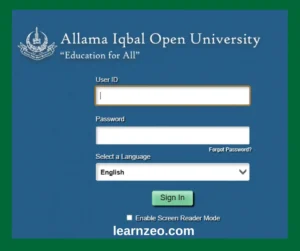
The AIOU CMS portal (Campus Management System) is the university’s main academic record system. It runs on an Oracle-based, PeopleSoft-style interface, similar to systems used by large enterprise institutions worldwide.
Through the CMS portal, students manage almost every administrative task connected to their degree.
You can use the CMS portal to:
- Complete your AIOU enrollment for each new semester
- View your admission and course history
- Check your AIOU results and download your Detailed Marks Certificate (DMC)
- Update personal profile information
- View tutor allocation for assignment evaluation
- Download an unofficial transcript
What Is the AIOU LMS (Aaghi) Portal?
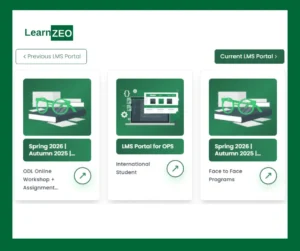
The AIOU LMS, officially called Aaghi LMS, is the university’s digital classroom. This is where actual learning happens.
Unlike the CMS portal, which manages records and admin work, the LMS focuses on teaching and interaction between students and tutors.
On the AIOU LMS portal, students can:
- Download course PDFs, video lectures, and study notes
- Submit assignments online before deadlines
- Join live online workshops
- Communicate with assigned tutors
- Track submitted assignment grades
AIOU CMS vs LMS Portal: Key Differences
As many students do not know the difference between these portals, here is a main difference between the CMS & LMS.
| Feature | CMS | LMS |
|---|---|---|
| Full Name | Campus Management System | Learning Management System |
| Main Purpose | Enrollment, admission, results | Course content, assignments, workshops |
| Used For | Fee status, DMC, transcripts | Lectures, assignment uploads |
| Account Creation | Created at the admission stage | Auto-created after admission confirmation |
| Result Checking | Yes, primary source. | No |
| Tutor Communication | No | Yes. |
How to Login to the AIOU CMS Portal
Follow these steps to access the AIOU CMS login page without errors:
- Open your browser and go to enrollment.aiou.edu.pk.
- Enter your registration number in the User ID field.
- Type your password in the password field.
- Click “Login” to open your dashboard.
- Navigate to the required tile—enrollment, results, or transcript.
How to Login to the AIOU LMS Portal
The AIOU LMS login process is just as simple:
- Visit lms.aiou.edu.pk (Aaghi LMS).
- Enter your student ID or registered email.
- Enter your password carefully—the system is case-sensitive.
- Click “Sign In” to reach your course dashboard.
- Select your enrolled course to view materials and assignments.
If this is your first login, search your registered email for the credentials AIOU sends after enrollment confirmation. If nothing arrives within a few working days, contact AIOU’s Aaghi support team.
AIOU CMS Login Password: Reset and Recovery
If you forget your AIOU CMS login password, then here is the way to reset it:
To reset it:
- Go to the CMS portal login page.
- Click “Forgot Password.”
- Enter your registration number and registered email or phone number.
- Follow the reset link sent to your email.
- Create a new password using a mix of letters, numbers, and symbols.
AIOU Enrollment Process Explained
AIOU enrollment is carried out every semester and is different from your original admission. Failure to meet an enrollment deadline can delay your entire academic timeline.
Here’s the general process through the CMS portal:
- Log in to the CMS portal using your registration number.
- Go to the “Course Enrollment” section on your dashboard.
- Select available courses for the upcoming semester.
- Confirm your selection and generate the fee challan.
- Pay the fee before the deadline to finalize enrollment.
Once payment is confirmed, your enrolled courses immediately connect to your LMS dashboard, giving you access to that semester’s study material.
AIOU Admission Portal for New Students
If you are currently applying for any program in AIOU, you will use a separate system called the AIOU admission portal, distinct from the enrollment CMS used by continuing students.
The admission process generally includes:
- Visiting the official AIOU admissions page and selecting your desired program.
- Filling out the online admission form with personal and academic details.
- Uploading scanned documents (previous certificates, CNIC, and photo).
- Paying the admission fee via bank challan or online transfer.
- Waiting for confirmation, after which CMS and LMS credentials are issued.
Programs range from matriculation and FA/FSc to bachelor’s, master’s, MPhil, and PhD; this makes AIOU one of the most accessible universities in Pakistan for distance learners.
How to Check AIOU Results Online
Checking AIOU results is one of the most searched tasks and confusing things for students each semester. There are two methods to check your AIOU result.
Method 1: Through the CMS Portal (Recommended)
- Log in at enrollment.aiou.edu.pk.
- Click the “Exams & Grades” tile.
- Select “My Grades.”
- Choose the relevant semester.
- View your subject-wise marks and download your DMC.
Method 2: By Roll Number (Historical Results)
Older result records can sometimes be checked using only your roll number through AIOU’s public result-history pages, while the CMS portal remains the primary and most reliable source for current semester results.
See Also: Air University Admissions 2026
Case Study: A Student’s Journey from Admission to Result
To make this practical, here’s how the process looks for a typical AIOU student.
Background: One of our students applied for a B.Ed. program at AIOU because she needed a flexible schedule around her job.
Step 1 – Admission: She applied through the AIOU admission portal, uploaded her documents, and paid the challan within the deadline. Within two weeks, she received her CMS credentials by email and SMS.
Step 2 – Enrollment: Using the CMS portal, she selected her semester courses and generated her enrollment fee challan. After payment, her enrollment was confirmed within 3–5 working days.
Step 3 – LMS Access: Her Aaghi LMS account activated automatically. She logged in, downloaded her course books, and joined her first online workshop within the same week.
Step 4 – Assignments: She submitted assignments directly through the LMS before each due date, tracking feedback from her tutor in real time.
Step 5 – Results: At semester end, she logged back into the CMS portal, opened “Exam & Grades,” and downloaded her DMC.
Common Login Problems and Fixes
| Problem | Likely Cause | Fix |
|---|---|---|
| CMS login not working | Wrong registration number format | Re-check the admission slip for the exact format. |
| LMS shows a blank dashboard. | Enrollment not yet synced | Wait 24–48 hours after fee confirmation. |
| Password rejected repeatedly | Caps Lock or old password | Reset via “Forgot Password” |
| No credentials received | Email delay or spam filter | Check the spam folder, then contact support. |
| Portal not loading | Browser cache issue | Clear the cache or switch browsers |
Why AIOU Uses Two Separate Portals
Many students remain confused as to why AIOU doesn’t merge CMS and LMS into a single system. The separation actually reflects standard practice at large universities:
- CMS is an enterprise-grade administrative system handling sensitive records like fees, results, and transcripts.
- LMS is a teaching platform optimized for content delivery and student-tutor interaction.
FAQs
Is the AIOU CMS portal the same as the LMS portal?
No. The CMS portal handles enrollment, admission documentation, and results, while the LMS (Aaghi) portal is used for course content, assignments, and workshops.
What should I do if I forget my AIOU CMS login password?
Use the “Forgot Password” option on the CMS login page and follow the reset instructions sent to your registered email.
How do I check my AIOU results if the CMS portal is down?
Wait a few hours and try again, or check AIOU’s official result history pages for previous semester records using your roll number.
Do I need separate accounts for CMS and LMS?
Your LMS account is typically created automatically using the same student information once your admission is confirmed through the CMS/admission portal.
Can I access AIOU LMS and CMS from a mobile phone?
Yes, both portals are mobile-browser friendly, though a stable internet connection is recommended for uploading assignments.
Conclusion
Being a student of Allama Iqbal Open University, understanding the AIOU CMS/LMS portal system is essential for you, from matriculation to PhD level. The CMS portal manages your enrollment, admission process, and results, while the AIOU LMS delivers your actual course content and assignments.

Sufyan Ghafoor Qazi is an undergraduate student. Throughout his educational journey from 2020 to 2026, he faced many problems in getting the correct information, but this gave him ways to find the correct source for applying for any job, admission, or entry test. Thus, he came to share that solution with other students too so that they do not face the same issues.